

Thanks so much Martin, it’s such a relief! I’m really grateful.


If you have friends and family coming to visit at Christmas, someone will usually end up using your computer and there are a few things you can do in advance to ensure that people can use your computer safely without causing any problems.
One of the most important things you can do is to ensure that you have a password on your account on the computer. This will stop anyone just logging in and using the computer and will help keep your personal information private.
If you're using a Mac, your account will already have a password, if you're using Windows, then you may not have set one up, if not, then go into the Control Panel and then click on the Users heading and you can add a password to your account in there.
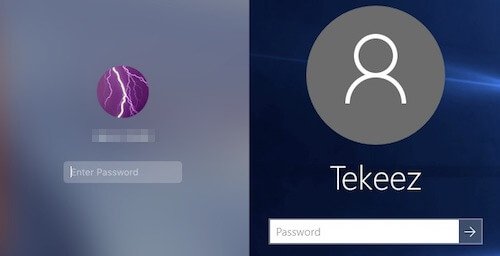
The safest way to allow other people to use your computer is to switch on the Guest user. This allows people to log into a separate account that is removed when they've finished so nothing they do online or download onto the computer is stored once they log out.
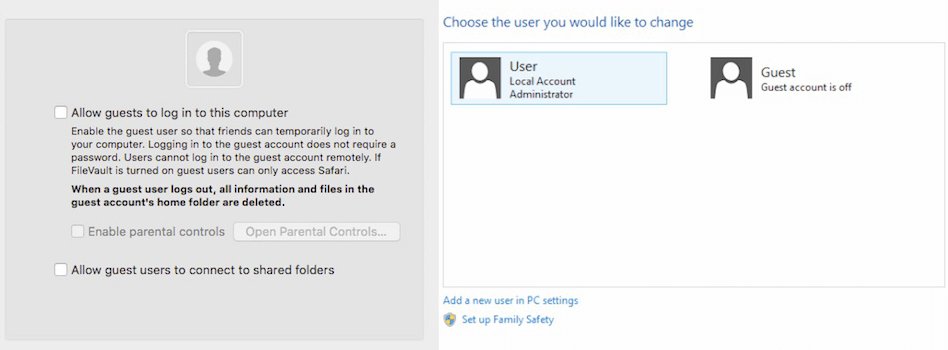
On the Mac, open up System Preferences and then go into Users & Groups and put a tick in the box to allow guest users to log into this computer.
If you're running macOS 13 or newer, open System Settings, click on Users & Groups, click on the I next to Guest User and then toggle that option on.
On Windows 8.1 or earlier go into Control Panel, Users and then turn on the Guest account. Unfortunately Windows 10 and 11 doesn't yet have this feature, but you can always create a new account for people to use and then remove it once you no longer need it.
As always, it's a good idea to ensure that your anti virus software and backups software is running properly just in case anything malicious gets downloaded or anything gets deleted by accident.
Now that most people have their own smartphones or tablets, people may just want to get onto your WiFi network in order to get online and keep up with friends. If your router supports it, setting up a guest WiFi network is a great idea as it keeps their machines separate from your main network and keeps your WiFi password secure.
Another important thing to remember, which should be followed all year round is to keep food and drink away from the computer. One little spill onto a laptop can have terrible consequences so it's best to keep the computer completely separate from where people are eating.
If you follow these tips, then your computer should be safe for use by guests over the Christmas holiday and all your personal files and emails will be safely out of reach.
One of the most important things you can do is to ensure that you have a password on your account on the computer. This will stop anyone just logging in and using the computer and will help keep your personal information private.
If you're using a Mac, your account will already have a password, if you're using Windows, then you may not have set one up, if not, then go into the Control Panel and then click on the Users heading and you can add a password to your account in there.
The safest way to allow other people to use your computer is to switch on the Guest user. This allows people to log into a separate account that is removed when they've finished so nothing they do online or download onto the computer is stored once they log out.
On the Mac, open up System Preferences and then go into Users & Groups and put a tick in the box to allow guest users to log into this computer.
If you're running macOS 13 or newer, open System Settings, click on Users & Groups, click on the I next to Guest User and then toggle that option on.
On Windows 8.1 or earlier go into Control Panel, Users and then turn on the Guest account. Unfortunately Windows 10 and 11 doesn't yet have this feature, but you can always create a new account for people to use and then remove it once you no longer need it.
As always, it's a good idea to ensure that your anti virus software and backups software is running properly just in case anything malicious gets downloaded or anything gets deleted by accident.
Now that most people have their own smartphones or tablets, people may just want to get onto your WiFi network in order to get online and keep up with friends. If your router supports it, setting up a guest WiFi network is a great idea as it keeps their machines separate from your main network and keeps your WiFi password secure.
Another important thing to remember, which should be followed all year round is to keep food and drink away from the computer. One little spill onto a laptop can have terrible consequences so it's best to keep the computer completely separate from where people are eating.
If you follow these tips, then your computer should be safe for use by guests over the Christmas holiday and all your personal files and emails will be safely out of reach.

FEATURED PRODUCTS







Featured Product
Why not follow us?


Tekeez support both PC/Windows users and Mac users equally, so whether you have a Mac or a PC we can help.
Tekeez are proud to have been providing legendary IT Superhero services and support for 30 years, since 1994.
Why not try our services and discover the secret of our success?






© 1994-2026 EuroSolve Ltd - Tekeez® is a registered trademark and brand of EuroSolve Ltd
0333 023 0001.
0333 023 0001.
Tekeez® Oxford:
Prama House • 267 Banbury Road • Oxford • OX2 7HT
Tekeez® Caerphilly:
Britannia House • Caerphilly Business Park • Van Road • Caerphilly • CF83 3GG