

Thank you all for your support with all this the past couple of days - a great service as always.


When you upgrade your iPhone to iOS 15, one of the first changes you'll notice is that the address bar in Safari at now at the bottom of the screen, handily located right under your thumb.
If you don't like this change and would prefer the address bar to be at the top of the screen again, follow the simple steps below to move it back to the top.
Firstly, open Settings on your iPhone and then scroll down and tap on Safari.

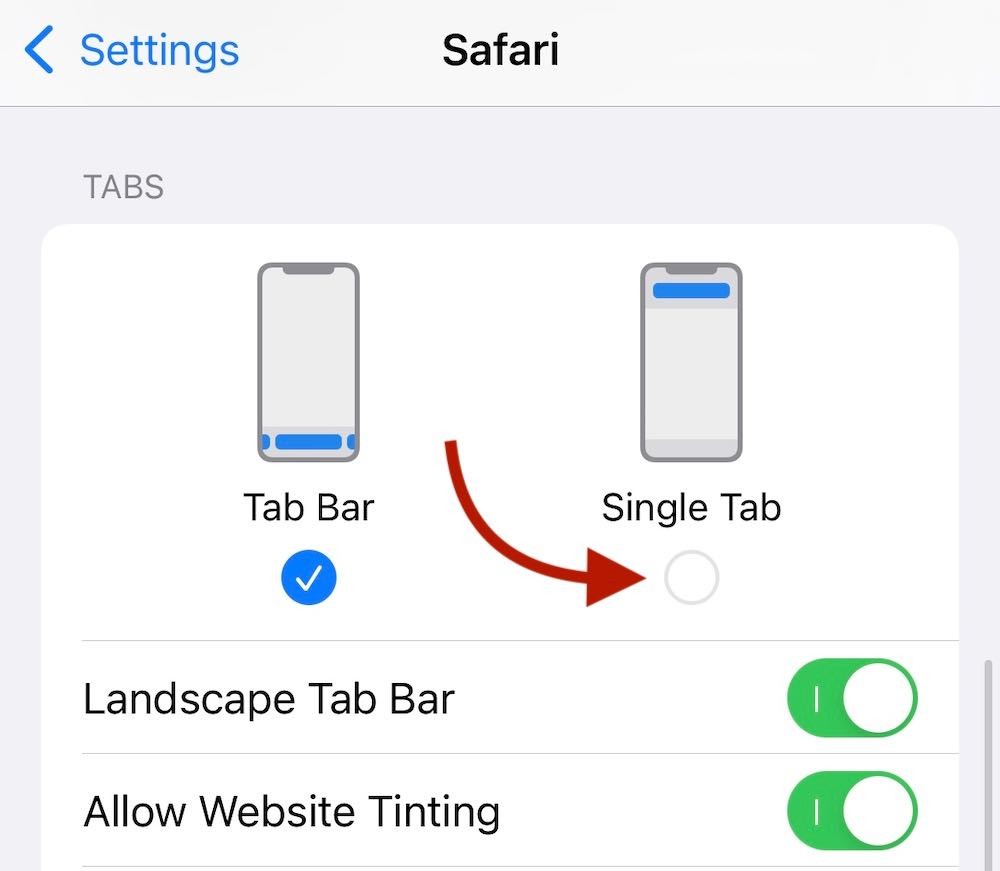
Now all you need to do is tap on Single Tab as shown below and your address bar will be back at the top where it was before.
There are lots of other new features and changes in iOS 15 so if there's anything you'd like to see covered in a Tekeez Tip, please do let us know.
If you don't like this change and would prefer the address bar to be at the top of the screen again, follow the simple steps below to move it back to the top.
Firstly, open Settings on your iPhone and then scroll down and tap on Safari.
Now all you need to do is tap on Single Tab as shown below and your address bar will be back at the top where it was before.
There are lots of other new features and changes in iOS 15 so if there's anything you'd like to see covered in a Tekeez Tip, please do let us know.







Featured Product
Why not follow us?


Tekeez support both PC/Windows users and Mac users equally, so whether you have a Mac or a PC we can help.
Tekeez are proud to have been providing legendary IT Superhero services and support for 30 years, since 1994.
Why not try our services and discover the secret of our success?






© 1994-2026 EuroSolve Ltd - Tekeez® is a registered trademark and brand of EuroSolve Ltd
0333 023 0001.
0333 023 0001.
Tekeez® Oxford:
Prama House • 267 Banbury Road • Oxford • OX2 7HT
Tekeez® Caerphilly:
Britannia House • Caerphilly Business Park • Van Road • Caerphilly • CF83 3GG